
Everything your restaurant needs, in one simple system
Take orders, run the kitchen, take payments, watch your costs and see your profit, from the till, the table or your phone.
Get Started FreePOS terminal
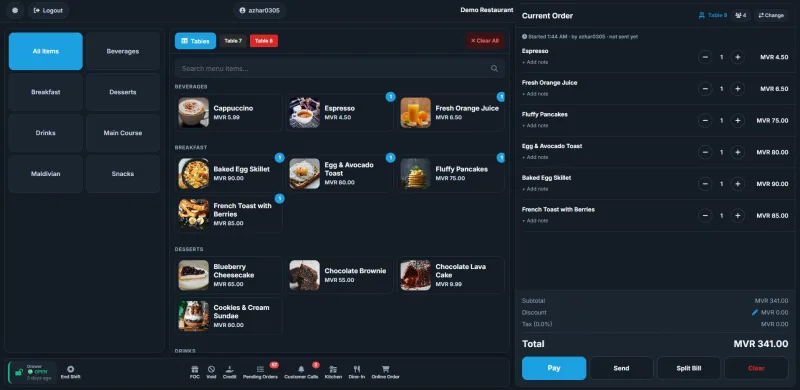
Fast to learn, quick at the busiest hour, and it keeps going when the internet does not.
Live floor plan
Every table at a glance: free, occupied or reserved, with how long guests have been seated.
Big, simple buttons
Tap a table, tap the dishes, Send. Notes for the kitchen on any dish.
Split bill
Split by guest or by dish, and take each share by cash, card or transfer.
Discounts with control
A limit for each login; bigger discounts need a manager's password, with the reason recorded.
Voids and free bills
Cancel or give a bill free only with a manager's approval and a reason, all kept on record.
Credit customers
Regulars can pay later, within a credit limit you set, with statements and reminders.
Works offline
No internet? Keep sending orders and taking cash and card. It all uploads when the connection is back.
Any device
A till, a laptop, an iPad or a phone: the same POS, laid out for each screen.
QR menu and online ordering
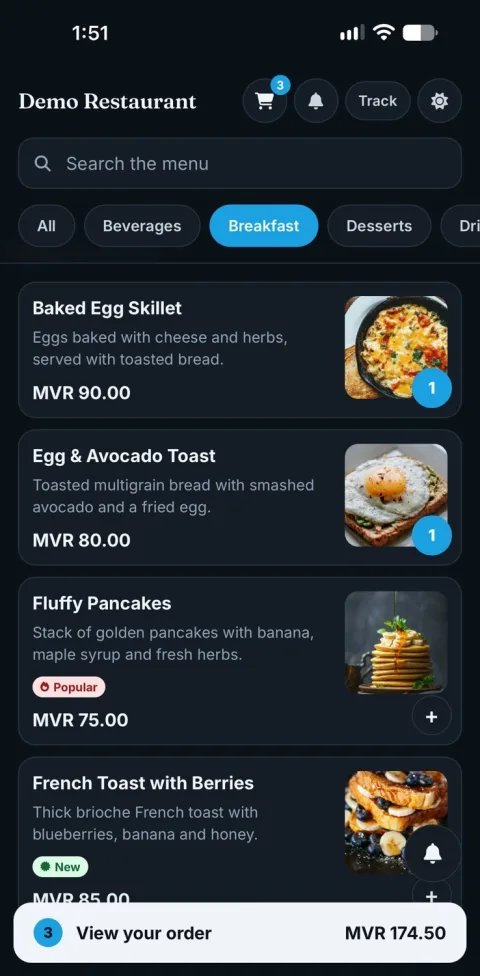
Guests order from their own phone, at the table or from home.
Scan, order, eat
A QR code on each table opens your menu with photos. Orders go straight to the POS.
Call the waiter
Guests ask for the waiter or the bill from their phone; staff see it on the POS.
You stay in charge
Accept or reject each customer order before the kitchen sees it.
Delivery and takeaway
Your own online ordering page, with delivery fees, bag charges and order tracking.
Bank transfer
Customers upload the transfer slip; you check it before accepting the order.
Your brand
Your colour and logo on the pages your customers see.
Kitchen display
Orders reach the kitchen the moment they are sent: no paper, nothing lost.
In seconds
Every order from the POS, the QR menu and online ordering on one screen.
Timers
Each order shows how long it has waited; late ones stand out.
Ready at a tap
Mark dishes ready and the floor staff know at once.
Payments and cash
Every payment recorded, every shift counted.
Every way to pay
Cash, card, bank transfer, swipe and credit, or a mix of them on one bill.
Shifts and cash drawer
Open the drawer with a float, close it with a count; the difference is worked out for you.
Receipts and invoices
Tax invoices with their numbers, printed or reprinted at any time.
Stock and costs
Know what every dish costs you, and where the money goes.
Inventory
Stock levels, low-stock warnings and what moves fastest.
Recipes and food cost
Build a dish from its ingredients and see its cost and margin.
Food waste
Record what is thrown away and what it cost, to bring it down.
Purchases and expenses
Supplier invoices with their GST, and running costs like rent and salaries.
Your team
The right access for each person, and a clear record of who did what.
Roles and permissions
Owners, managers, cashiers and waiters each see only what they need.
Clock in with a PIN
Staff clock in and out on the POS; hours worked are added up for you.
Audit log
Every discount, void, refund and change is recorded with who and when.
Reports and tax
Clear answers, ready to print or send to your accountant.
Daily summary
Sales, payments, discounts and every dish sold, for the day.
Profit and loss
Sales, purchases and expenses put together: what you really made.
Dish profit
What each dish earns after its cost, and which dishes carry your menu.
MIRA GST
Output and input tax statements in the layout MIRA asks for, as PDF and CSV.
Control reports
Discounts, cancelled bills and free bills: who, when and why.
Every location
One login for all your outlets, each on its own or side by side.
And more
Ready to see it in your restaurant?
Set up in minutes. No hardware to buy: use the tablet or laptop you already have.